


MOJO Sports
4.1114.00 Reviews
App Specs
- Version
- 1.67.0+production-release
- Updated On
- License
- Free
- Downloads
- 100,000+
- Developer
- MOJO Sports
- Categories
- Sports
- Platform
- Android
Screenshots
 Analysis by AppCompare
I see MOJO Sports as a better fit for organizing youth team sports than for tracking personal fitness goals. Its focus on coaching and streaming can help a coach bring practice and game-day tasks into one routine, but it is not the all-purpose workout tracker described in the older version of this review. That distinction matters: if you want a training plan for your own gym sessions, you may be happier with a dedicated fitness app; if you help run a team, this is the sort of sports tool worth examining.
Where a team-focused sports app earns its place
The name points toward a broad sports audience, while the practical value is clearest when several people share responsibility for a team. A coach has to plan sessions, communicate with families, and make useful moments from games available to others. A focused app can reduce the need to keep those jobs scattered across messages, notes, and a separate video workflow. I would judge it less by whether it replaces every tool and more by whether it makes those recurring team tasks easier to manage.
MOJO Sports is a free sports app from MOJO Sports, with optional in-app purchases ranging from $1.99 to $59.99 per item. It has an average rating of 4.1 from around 238 ratings, and has passed 100,000 installs. Those figures suggest that it has found an audience, but they do not tell me whether it suits a particular league or coaching style. The meaningful test is whether its approach to coaching and streaming matches the way your team actually works.
For a volunteer coach, the appeal is practical. Team duties often happen in spare moments: a practice plan is checked before leaving work, a parent asks where to find a game video, or a player needs a reminder about the next session. Keeping a shared routine in one sports app can make those handoffs less awkward. It may also give families a more predictable place to look than a mix of group texts and scattered clips.
Making practice and game day work together
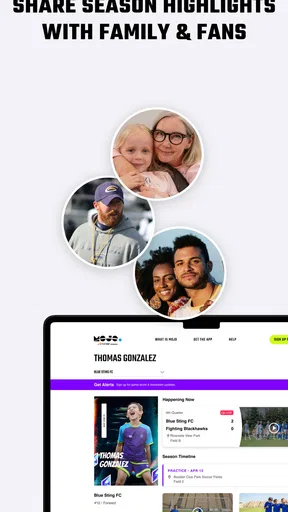
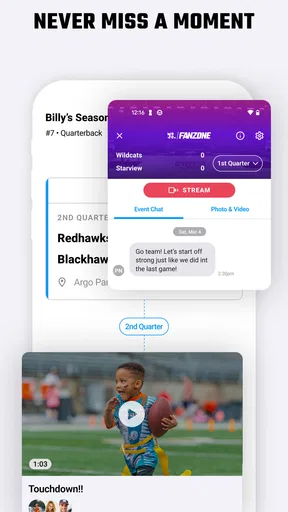
The strongest reason to consider a coaching-and-streaming app is the connection between what happens at practice and what families can review later. A coach can think about a session not only as a set of drills, but also as preparation for the next game and a chance to help players understand what they are learning. A clip can make a coaching point easier to revisit than a long explanation sent after everyone has gone home.
One useful workflow is to choose a small number of teaching points before a game, then use the resulting footage as a prompt for a short conversation afterward. That keeps video from becoming a substitute for coaching or an endless replay session. The value is in giving players a specific moment to discuss: a decision, a movement, or a team habit. I would avoid trying to turn every game into a detailed film review, especially with younger players who benefit more from a clear, encouraging takeaway.
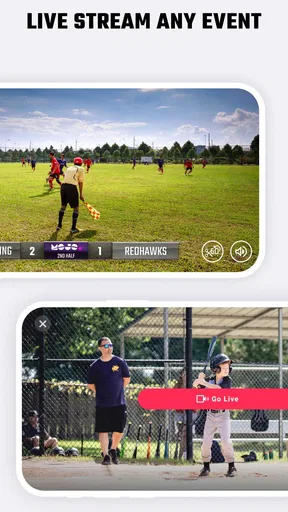
There is a trade-off here. Streaming or recording adds a job to a day that may already be busy, and it only helps if someone can handle it without losing focus on the game. Before relying on it, I would decide who is responsible for the phone and how the team will share the result. If the coach is also managing substitutions and keeping players engaged, asking that same person to operate a camera may be unrealistic. A parent or assistant who can take that role makes the workflow more sustainable.
Worth Reading Before You Choose

Flipboard Shows What News Apps Must Do Beyond the Feed

Switching to Android Auto Means Rethinking Your Driving Routine

Google Calendar Makes a Crowded Week Easier to Manage

Ludo King Makes the Most of the Minutes Between Plans

Baby Panda World Brings Quick Play to Modern Phones, but Its Game Library Feels Busy

ESPN’s Live Game View Makes Following Close Games Easier
What it changes compared with familiar alternatives
The usual alternative is not always another sports platform. Many teams manage with a messaging group, a calendar, paper notes, and whatever video app a parent already uses. That arrangement is flexible and costs little to maintain, but it can make information hard to find once the season gets busy. A team-oriented app is most useful when it gives people a clearer shared routine, rather than simply adding another place they must check.
For individual athletes, a conventional fitness tracker is likely the more natural choice. Those apps are generally built around personal activity logs, exercise history, or wearable data. A coaching and streaming tool serves a different purpose: it is about helping a team run and making sports activity easier to share. I would not choose it just because I want charts about my own workouts. The better choice depends on whether the problem is personal training or team coordination.
Another alternative is to keep video entirely separate from coaching. That can be simpler if the team only wants an occasional recording, but it leaves the coach to connect the footage with practice conversations elsewhere. A unified sports workflow can save that mental effort, though it is only an advantage if families and staff are willing to use it consistently. If half the team stays in text messages and the other half checks the app, the convenience quickly disappears.
Small habits that make the setup more useful
I would start with one clear purpose instead of asking the whole team to adopt every available part of the app at once. For example, a coach could use it first to make one routine easier—sharing coaching material or handling a streaming task—then see whether families find that helpful. This is a more realistic test than announcing a complete digital overhaul at the start of a season. It also gives the coach a chance to spot friction before the app becomes part of every game day.
It helps to agree on a simple communication rule before inviting a whole team. Tell families which information belongs in the app and which still needs a direct message, especially for urgent changes. That prevents a common problem with team tools: people assume someone else has seen an update. A shared platform can reduce scattered communication, but it cannot make everyone check it at the right moment without a habit and clear expectations.
For video, I would set expectations about who is meant to watch and what the footage is for. A recording intended to help players learn can feel different from one treated as a public highlight reel. Coaches should also consider the comfort of families and players before making a stream part of the routine. The best use is purposeful and respectful: make it clear how the video supports the team, rather than recording simply because the option exists.
One question a coach may have is whether this can replace the team’s existing communication tools. I would not assume that it should. A new platform is worth keeping when it makes an important task simpler; it is not automatically better to move every conversation and reminder into one place. Start with the job the app handles best for your group, and keep the rest of the routine uncomplicated.
Another practical question is whether a family needs to use it for the coach to benefit. The answer depends on the team’s workflow. A coach may find value in organizing their own coaching or streaming routine, but shared communication and viewing naturally work better when the intended audience knows where to go. I would explain the reason for using the app and keep instructions short, rather than expecting every parent to figure out a new tool unaided.
Who should give it a try—and who should look elsewhere
This app makes the most sense for coaches, team organizers, and families who want a more deliberate way to connect coaching with sports video. It is particularly worth considering when a team repeatedly loses useful information across separate chats or struggles to make game footage part of player development. A coach who enjoys keeping a consistent routine may get more from it than someone who only needs to send an occasional schedule change.
I would skip it if your main goal is monitoring your own runs, gym sessions, or wearable statistics. I would also hesitate if your team already has a simple process that everyone follows and nobody is asking for a new one. A tool is not an improvement just because it has more capabilities; the time needed to teach it and keep it current has to be worth the result. For a casual group that meets irregularly, ordinary messages may remain the easier option.
Age and device fit are straightforward considerations. The app is rated for Everyone and supports devices running Android 8.0 or later. Its current version is 1.67.0+production-release. That makes it relevant to a broad audience, but the suitability of any team workflow still depends on the adults coordinating it and on families being comfortable with the way the team shares information.
What to expect before making it part of the season
The free entry point makes it possible to explore the app without paying upfront, while optional purchases mean some items can carry an additional cost. I would check the purchase details in the app before treating any paid option as essential to a team budget. If a coach is recommending it to families, that cost conversation should happen openly rather than leaving parents to discover it later.
Its release date is February 24, 2021, and the app has continued to a current version of 1.67.0+production-release. For a team tool, ongoing usefulness matters more than novelty: the important question is whether the features still fit the way your group coaches and shares sports activity. I would install it before a low-pressure practice or planning session, not for the first time minutes before an important game. That gives the coach room to learn the routine and identify any setup steps that could distract from the event.
My overall view is that MOJO Sports is most compelling when coaching and streaming are connected parts of a team’s routine. It has a clear audience, but it should not be mistaken for a personal fitness tracker or assumed to replace every communication tool. If you coach a team and want a more organized way to support practices and share sports moments, it is worth trying with one simple workflow first. If your needs are individual exercise tracking or occasional informal coordination, a more specialized or familiar alternative will probably serve you better.
Have you ever found yourself struggling to keep track of your fitness goals or looking for a way to make your workouts more engaging? Well, let me introduce you to MOJO Sports, an app that's all about taking your sports and fitness game to the next level. I've been using it for a while, and here's the lowdown on what makes this app a potential game-changer.
Getting Started with MOJO Sports
First things first, getting started with MOJO Sports is super straightforward. After downloading the app from the Google Play Store or Apple App Store, you'll be prompted to create an account. This step is pretty standard, but MOJO has a neat way of customizing your experience right from the get-go. The setup includes a quick survey to understand your fitness goals, preferred sports, and current activity level. It's like the app gets to know you personally!
Once you're all set up, the home screen greets you with a clean, intuitive interface. Trust me, even if you're not tech-savvy, you'll navigate like a pro. The dashboard is packed with features, but it's organized in a way that feels inviting rather than overwhelming.
Features that Stand Out
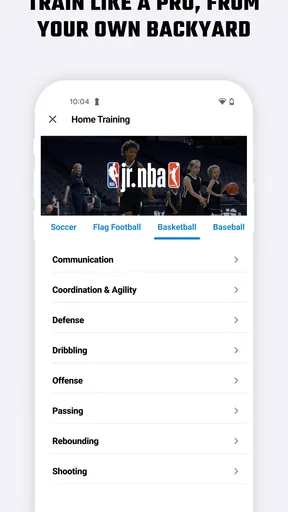
Now, let's talk features because MOJO Sports is brimming with them. One of my favorites is the personalized workout plans. Based on your initial setup, the app crafts workout routines tailored to your goals. Whether you're looking to build muscle, improve endurance, or just stay active, MOJO has you covered. And if you're into specific sports like basketball or soccer, you can find specialized drills and training programs. It's like having a personal coach in your pocket.
Another standout feature is the community aspect. You can join groups, participate in challenges, and even compare your stats with friends. It adds a social element that makes working out feel less solitary and more like a team effort. Plus, there's something about a little friendly competition that really gets you motivated.
For the tech enthusiasts, MOJO Sports integrates seamlessly with wearables and other fitness apps. Syncing my smartwatch was a breeze, and I love how it tracks my progress in real-time. The app also offers detailed analytics, so you can dive deep into your performance trends. It's a data lover's dream!
User Experience and Design
I have to give props to the MOJO Sports design team. The app is visually appealing with vibrant colors and high-quality graphics. Navigating through different sections feels smooth, and I haven't encountered any glitches or crashes – a huge plus in my book.
The only thing I found slightly annoying was the occasional pop-up ad, but hey, the app has to make money somehow, right? It’s a minor inconvenience considering the wealth of features available for free. And if you're not a fan of ads, there's always the option to upgrade to a premium version.
Final Thoughts
So, what’s the verdict? MOJO Sports is definitely worth checking out if you're serious about sports and fitness. It's user-friendly, packed with features, and has a vibrant community that keeps you engaged. Whether you're a seasoned athlete or just starting your fitness journey, this app provides the tools and motivation you need to succeed.
In a nutshell, MOJO Sports turns your smartphone into a personal trainer, workout buddy, and data analyst all rolled into one. So, if you're ready to spice up your fitness routine and achieve those goals, give MOJO Sports a try. You might just find it becomes your new favorite app!
Pros
- User-friendly interface for easy navigation.
- Wide range of sports covered comprehensively.
- Real-time updates keep you informed instantly.
- Customizable notifications for favorite teams.
- Engaging community features for interaction.
Cons
- Occasional bugs during live streaming.
- Limited offline access to content.
- Ads can be intrusive at times.
- High data usage for live updates.
- Some features require a subscription.
FAQs for MOJO Sports
What is MOJO Sports and what does it offer?
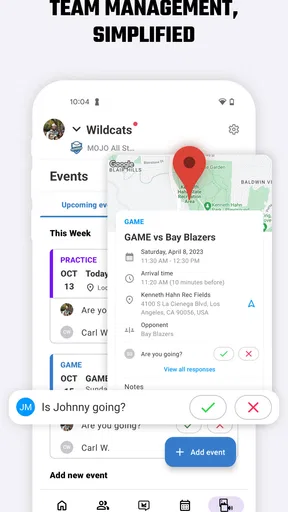
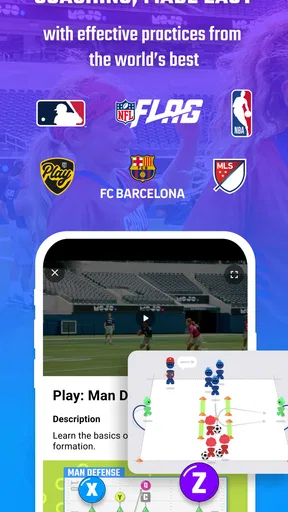
MOJO Sports is a comprehensive app designed for coaches, parents, and young athletes to enhance their sports experience. It provides expertly crafted practice plans, instructional videos, and team management tools. The app aims to simplify the coaching process and improve skill development across various sports.
Is MOJO Sports free to use, or are there any subscription fees?
MOJO Sports offers a free version that includes basic features such as team management and limited practice plans. For access to premium content and advanced features, users can subscribe to a paid plan. The subscription provides an enhanced experience with exclusive drills, videos, and coaching tips.
Which sports are supported by MOJO Sports?
MOJO Sports supports a wide range of sports, including soccer, basketball, baseball, and more. Each sport comes with tailored practice plans and resources to cater to different skill levels and age groups, making it a versatile tool for coaches and athletes involved in multiple sports.
Can MOJO Sports be used offline?
Yes, MOJO Sports allows users to download practice plans and videos for offline use. This feature is particularly beneficial for coaches and athletes who may not have internet access on the field or court, ensuring uninterrupted practice sessions and learning opportunities.
How does MOJO Sports ensure the quality of its coaching content?
MOJO Sports collaborates with professional coaches and sports organizations to develop its content. The app provides high-quality, research-backed practice plans and instructional videos that are regularly updated to align with current coaching methodologies and trends, ensuring users receive reliable and effective guidance.


